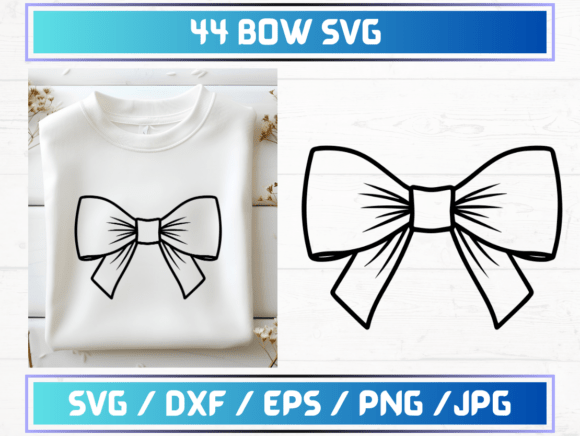
44 Bow SVG Files: A Designer’s Review of Graphics and Graphic Templates
When a client approaches me with a request for a brand identity that feels both whimsical and polished, my first instinct is to look at the visual language. Are we going for rigid minimalism? Or is there room for softness, texture, and decorative flair? Recently, I evaluated a comprehensive design bundle titled 44 Bow SVG Files to determine if it had the versatility required for a real-world commercial project. Specifically, I was considering its application for a boutique handmade candle company launching a seasonal collection. The goal was to create packaging labels, social media graphics, and digital marketing assets that felt cohesive yet distinct.
Upon opening the ZIP folder, the immediate impression was one of organized abundance. The inclusion of 44 unique variations meant that I wasn't just getting a single clipart element; I was getting a system. For a designer, having a library of related assets is crucial for maintaining brand consistency across different touchpoints. The files were provided in multiple formats—SVG, PNG, DXF, JPG, and EPS—which immediately signaled that this product was built with both digital and physical production in mind. This multi-format approach is rare in lower-tier design bundles and speaks to the utility of these graphic templates for diverse workflows.
Visual Mood and Design Direction
The aesthetic of the bow illustrations leans toward modern elegance with a touch of playful charm. In the context of the candle brand project, these bows could serve as primary decorative accents on jar labels or as standalone hero graphics for Instagram posts. The lines are clean, and the shapes feel balanced, which is essential when scaling vector graphics. If the strokes were too intricate or the proportions off, the design would fall apart when reduced to the size of a sticker or enlarged for a poster.
What stands out about this collection is its adaptability. While bows can sometimes lean heavily into traditional or vintage styles, these designs possess a contemporary simplicity that allows them to fit within a modern design framework. They do not overpower the typography but rather complement it. This balance is critical in brand identity work, where every element must support the core message without creating visual noise. The bows act as emotional cues, suggesting gift-giving, celebration, and care—emotions that align perfectly with a luxury handmade product line.
Performance in Real-World Scenarios
To truly judge a graphic design asset, you have to put it to work. Here is how the 44 Bow SVG Files performed during my mock-up testing phase:
- Packaging Design: When placed on a matte black label with gold foil text, the white SVG outlines of the bows created a striking contrast. The vector nature of the SVG files ensured that even the thinnest lines remained crisp, which is vital for high-end packaging design.
- Social Media Graphics: For a series of Pinterest pins promoting a holiday sale, I used the PNG versions with transparent backgrounds. The 300 dpi resolution meant they looked sharp on retina displays. I layered three different bow variations over a pastel gradient background to create depth, demonstrating how these digital products can be mixed and matched to create unique compositions without looking repetitive.
- Print-on-Demand Assets: I tested the EPS files in Adobe Illustrator to see how they would translate to apparel. The curves smoothed out beautifully, making them ideal for t-shirt design or tote bag prints. The variety of 44 options allowed me to assign specific bow styles to different product categories, adding a layer of curated detail that elevates a standard print-on-demand store.
- Cricut Projects: For clients who use cutting machines, the DXF files were a significant plus. I verified that the cut paths were closed and logical, which prevents common errors in vinyl cutting. This makes the bundle highly valuable for crafters and small business owners producing physical goods.
Strategic Placement and Visual Hierarchy
In any professional layout, understanding where an element belongs is as important as the element itself. These bow illustrations excel in large layout areas and as decorative accents. They work wonderfully framing a central logo or anchoring the bottom corner of a flyer. However, they should be used with caution in crowded layouts or minimalist branding contexts.
If you are designing for a corporate audience or a tech startup, these bows might introduce too much informality. They belong in spaces where warmth and personality are desired. Furthermore, when placing them on complex backgrounds, ensure there is sufficient contrast. A light-colored bow on a busy photograph will get lost, whereas a dark outline on a light background will pop. This attention to visual hierarchy ensures that the bow enhances the message rather than distracting from it.
Technical Considerations for Commercial Use
Before integrating any design assets into a client project, a rigorous technical check is non-negotiable. Here are the steps I recommend before purchasing or using this bundle commercially:
- Inspect Vector Editability: Open the SVG or EPS files in your preferred vector software. Check if the groups are logically named and if the anchor points are optimized. Clean vectors are easier to edit and result in smaller file sizes for web use.
- Check Transparency: Verify the PNG files for any unwanted halos or jagged edges around the curves. Since these are intended for sticker design and overlay use, clean transparency is paramount.
- Test Print Quality: Print a test page at actual size. Look for any aliasing or pixelation that might indicate the raster images are low resolution. For printable design projects, clarity is key.
- Font Pairing: Experiment with pairing the bows with different typefaces. I found that a bold sans serif font provided a nice structural contrast to the organic curves of the bows, while a delicate script font enhanced the feminine appeal. Avoid pairing them with overly ornate display fonts, as this can create visual clutter.
- Commercial Licensing: Always review the terms of service. Ensure you have the right to use these commercial design assets in final products sold to end consumers. Some licenses restrict resale, while others allow unlimited usage.
Final Verdict on Creative Utility
The 44 Bow SVG Files bundle offers exceptional value for designers, marketers, and content creators who need versatile, high-quality decorative elements. The sheer volume of options—44 distinct designs—means you are unlikely to run out of fresh ideas for a long-running campaign. The inclusion of multiple file formats (SVG, PNG, DXF, JPG, EPS) caters to a wide range of use cases, from web design and editorial design to physical manufacturing via Cricut or sublimation.
For small business owners and Etsy sellers, this bundle serves as a powerful tool to elevate their Etsy product listings. By using consistent, professional-grade graphics, you signal quality to your customers. For agency designers, it provides a quick way to generate mood boards and initial concepts that resonate emotionally with audiences seeking a touch of elegance and playfulness.
Ultimately, this is more than just a collection of clipart; it is a cohesive set of creative design tools that respect the principles of good graphic design. Whether you are building a brand identity from scratch or adding finishing touches to a marketing visuals campaign, these bows provide the polish needed to make a lasting impression. They are a smart investment for anyone looking to streamline their workflow while maintaining a high standard of aesthetic quality.